Posts

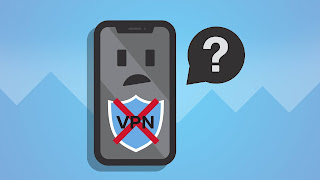
Here’s What to do When VPN not Connecting on Android
Image
  VPN is known as a   Virtual Private Network . It secures you against online monitoring, data sniffing, unauthorized access, and data theft. It offers to exchange and share their files safely with each other. It makes a virtual private route or channel to share files securely while linked to a public network. But according to several users, they are unable to connect to VPN on Android devices. If you wish to get rid of this issue, then pursue this blog. Remove Date and Cache Files for the VPN Application to Resolve VPN Issue on Android To remove data and cache files for the VPN app, go through the following procedure explained below: Launch the Settings on the device. After that, select the option of Apps to see the installed applications list on the device. Then browse for the application of the VPN you are using, then select it to launch the application settings. You should select the option of Storage. Now, you will locate the respective options of ‘Clear Data’ and ‘Clear ...

Here’s How to Use Dock on Apple Watch

  Dock on Apple Watch allows users to control your apps and make them more speedy and solid. The dock is especially used to control your music and instantly access apps. In the article, you’ll find more about the dock and its interactions with the apps that are quick as well as reliable. What Exactly Does Dock on Apple Watch Mean? The dock is not present at the bottom of your screen. You’ll find it by clicking the side button. And when you click the side button, then you’ll notice a vertically scrolled list of cards. And the display shows shortcuts of the recently accessed apps or favorites. You simply have to choose the option you’d want to see on your Apple watch. Shortcuts displayed on the screen will have the latest information from each app, and if you wish to check these cards quickly, you can without opening the app. Users can use the dock to switch through the apps via swiping or tuning the high-level crown. By using docks, users will notice the 10 apps opened recently in t...

Sony PlayStation 5 Pro and Rumors: Release Date and PS5 Pro Specifications

Image
  It is time to pay more attention to the more powerful model of the PlayStation 5. Sony launched the PS5 almost a year ago, which is hard to find online and offline markets. Some rumors claim that Sony is working on a new PlayStation 5 model with many enhanced upgrades. Sony might also push the internal upgrade to a PS6. PlayStation 5 Pro Rumors- Resolution and Refresh Rate PlayStation has tons of games that support 4K resolution. The next-generation PlayStation 5 Pro might deliver the actual 4K support. It could have the upcoming AMD silicon chipset to offer increased display resolution. Sony can use the upgraded hardware to increase the frame rate by more than 120 FPS or 120 FPS. PlayStation 5 Pro Rumors- Size We might see a reduced size in the PS5 Pro. The PlayStation 5 is great for cooling because of the 120 mm fans. Sony has also figured out how to cool the PlayStation better with the Heatsink technology. As a result, users might see a smaller device than the curr...

Here’s How to Solve Camera Failed Error on Samsung Galaxy Devices

Image
  Recently reports stated that Samsung users face issues and errors like a Camera failed error on their Samsung Galaxy devices. There are a variety of possible reasons and solutions. The app suddenly shuts down when you click “OK,” and your Samsung camera fails. We understand that this is a frustrating condition; therefore, here are some solutions to the Samsung camera failure issue. Let’s have a look at why you’re having this problem. On Samsung Galaxy devices, here’s how to solve the ‘camera failed.’ error. Why this Camera Failed Error Occur We all know that no device is perfect. Every problem, we know, has a cause. A few reasons for the camera failed error, particularly on Samsung devices, are listed below: If your OS version was just upgraded, there’s a risk that specific problems are preventing the camera App from working correctly. In addition, if the update is interrupted and not completed, certain apps may be harmed. There’s a danger that your internal storage can become cl...

UI 4.0 Features: Everything We Know So Far

Image
  Google has finally unveiled its Android 12 this year which comes earlier than usual. Previously the One UI 4 beta version was launched, and now the new One UI 4.0 for the Galaxy devices will arrive. Here in the blog post, we’ve mentioned all the new features that will arrive with the One UI 4.0. Features like improved privacy and security, lock screen widgets, and better AR Emojis are all expected to come in One UI’s latest version. Top 4.0 Features Updates in Camera and Microphone access You’ll get indicators while any app tries to use the camera and microphone of your device. New privacy limitations are introduced in Android 12 for users. Also, new buttons in the panel have been added to off or block the camera and microphone access to the applications used by the users. Inclusion of New Media Output Option Users are now allowed to connect and modify the music or movie audio playing easily. And the volume controls will not impact the other apps functionality. Updated Widgets Th...

Learn YouTube's Role in Creating Better Kids Content

Image
  According to a new blog post from YouTube, many creators worldwide have created an outstanding kid’s content for their viewers, and these changes will have a substantial impact on kids. We're dedicated to assisting creators in exploring this new platform and sustaining our family content ecosystem. YouTube can't say what video is designed for kids and what isn't because the FTC is ultimately in charge of enforcing the rules. If creators are concerned, YouTube suggests they check with their own legal counsel from outside YouTube.   In today's technology age, kids grow up where social media and video platforms provide them with a continuous stream of information. Increasing the standard on the quality of information consumed by kids and teenagers can positively impact their mental health, values, and attitude while also reducing the production and accessibility of harmful content. Learn more about YouTube’s role in creating better Kids content in our blog post. Ke...

Want to Disconnect Spotify from Your Facebook Account? Here’s How

Image
  Spotify is one of the most popular and commonly used music streaming services, and it covers a lot of excellent options that one can easily use to have the best music streaming experience. Anyone can set up and use Spotify on any of the devices, including Windows, Mac, and Linux computers, along with Android and iOS devices. On the other hand, Facebook is also a much-preferred social networking service that offers a lot of great features and options to all of its users. To enhance the experience of the users, both platforms keep adding new features from time to time. Also, one can link their Spotify account to their Facebook profile with much ease. Of course, if you want, you can easily   disconnect Spotify   from your Facebook account. Whenever you access Facebook or Spotify on any of your devices, it prompts you to sign in to your accounts using your username and password. And if you wish to disconnect both of your accounts linked to each other, you will need to follo...